Chapter 5
Creating a document
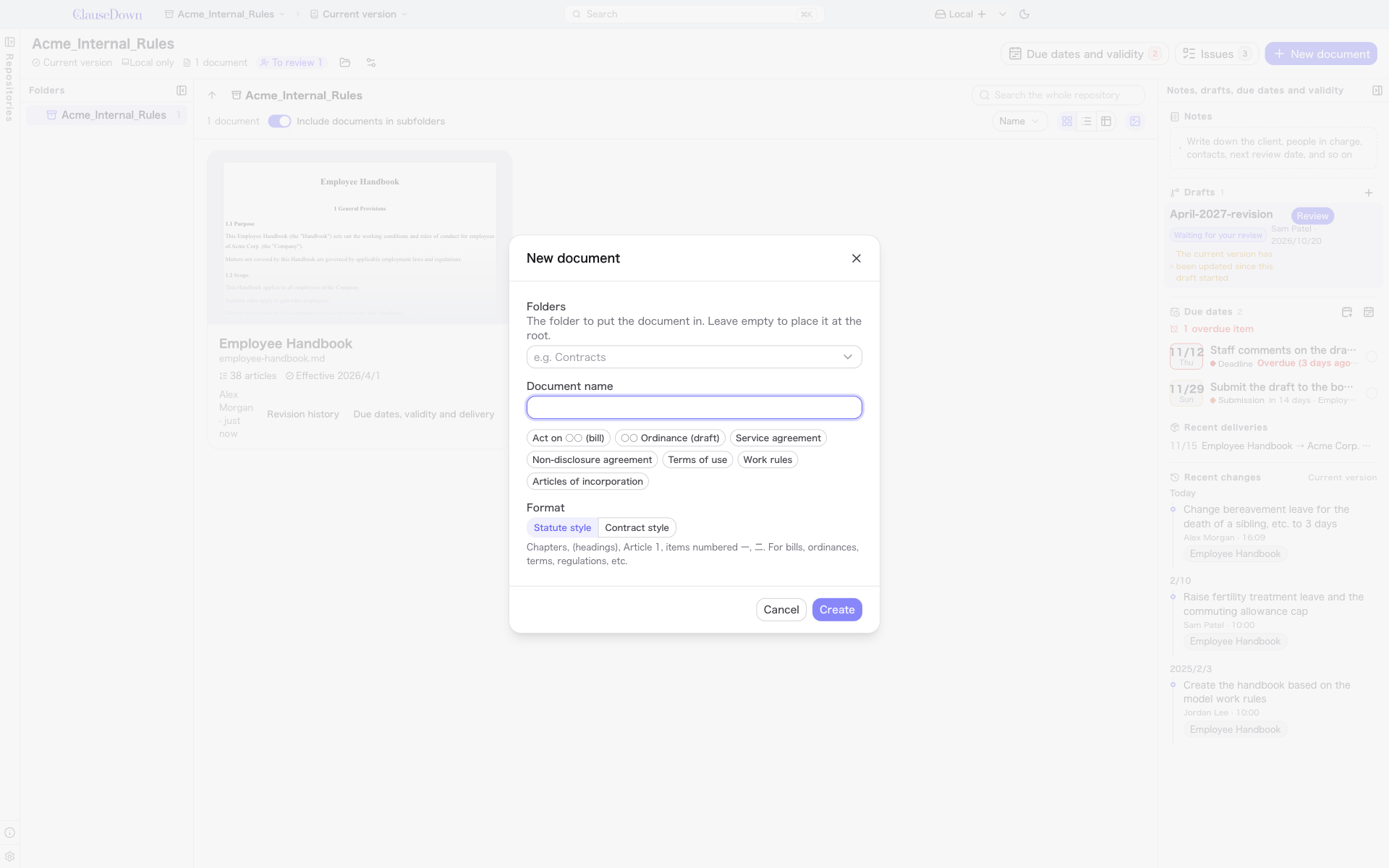
Click New document in the repository home or on Home.
-
Under Folders, enter the name of the folder for the document. Leave it blank to place the document at the top level of the repository.
-
Enter the Document name. Click one of the suggestions below the field (for example, a services agreement or work rules) to fill it in.
-
Choose a Format.
- Statute style: Chapters, a heading in parentheses on the line before the article, article numbers like 第1条 (Article 1), and items numbered 一, 二 (Japanese numerals). Suited to bills, ordinances, bylaws and internal rules.
- Contract style: The heading follows the article number on the same line, as in 第1条(目的) ("Article 1 (Purpose)"), and paragraph numbers use Arabic numerals.
These two formats are Japanese document styles. For English, German, French or other non-Japanese documents, choose the format system under Formatting after you create the document (see Overseas formats).
-
Click Create. The new document opens in the editor.